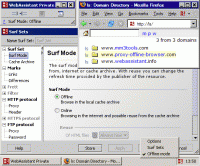
Archives visited web pages with your browser to be used online and offline. Offline each page is available with its original URL. You can even use your bookmarks offline. There is no difference between surfing the internet and surfing the archive.
The offline browser is a personal proxy server sitting behind your regular browser (Firefox, IE, Safari, Opera - whatever!), silently and speedily handling all the network traffic. Unlike most offline browsers with this concept, you don't have to specifically tell WebAssistant to capture a website - it remembers everything you see, automatically adding new pages to the cache. WebAssistant updates your cached pages (in the background) so you've always got the latest version to hand. There's no difference between surfing the web and surfing your archive; you can even use your bookmarks or search your pages offline when you don't have a network connection.
Your Benefits:
Work offline (train, plane, beach - wherever you like) without worrying that you have the info you need. Reduces the pressure of knowing what to save, and the necessity for repeating browsing sessions looking for something that was missed.
Incorporate the web into presentations or talks where you don't have internet access. You can sure you'll always have the page you need with WebAssistant.
Mobile users have the flexibility of accessing information from the web without having to worry about expensive access points. Shun overpriced wifi access ports - or at least only pay for what you really need.
Important Features:
Automatically archive all pages visited.
Accelerates in the web online browsing or updates the archive.
No difference between on- and offline browsing.
Links to resources of cache archives are marked for quick navigation.
Compare HTML pages from internet and archive. The changes are highlighted.
Browse and interactive navigation in the original hierarchy of downloaded pages.
Burn a site (or many sites) to CD for backup or archive.
Supports the protocols HTTP and FTP.
Supplied with a detailed manual, a simple and completely comprehensive installation and deinstallation.
The reader is an ideal addition to every browser!
Requirements:
• Java of version 1.4 or higher
Operating system:Windows All / Unix
Release notes:New Release

ImTOO 3GP Video Converter v3.1 is a professional mobile phone tool. It supports converting
various popular formats including RM, RA, 3GP, 3G2, WAV, MP3, AAC, WMA, MPG, M4A, AVI,
MP4, MOV, WMV, MPEG, CUE, APE, CDA and AVI to 3GP,RA, RM,AAC, M4A,XviD.
Price: $25.46, Rating: 8.2, Downloads: 107
Download

Total Audio Converter is the best tool to convert mp3, wav, flac, ogg, ape and much more. Look closer at it: TAC supports all audio formats, has built-in CD ripper and audio player, can be handled via command line and is still very user-friendly.
Price: $17.91, Rating: 6, Downloads: 100
Download

Reezaa WMA Converter is an easy-to-use all to WMA converter Converts all formats Video and Audio to WMA,WAV,MP3,OGG,FLAC,AMR,AC3,AAC.It supports MP3, AVI, WMV, MOV, 3GP, MP4, FLV, RM, RMVB, VOB, DAT, MPEG, WAV, WMA, ASF, OGG, RA etc.
Price: $29.95, Rating: 0, Downloads: 93
Download

Ultra QuickTime Converter is a powerful tool to help you convert QuickTime MOV, QT, MP4, M4V files to AVI, DivX, Xvid, MPEG1, MPEG2, WMV, VCD, SVCD, DVD, MP4, 3GP, FLV formats.
Price: $29.00, Rating: 10, Downloads: 73
Download
Jesterware DVD Audio Ripper is a powerful DVD Audio ripping program, which will take your DVD and convert the audio track into an audio formats of your choice.
Price: $24.99, Rating: 6, Downloads: 69
Download 
 MM3-WebAssistant - Proxy Offline Browser 2013